
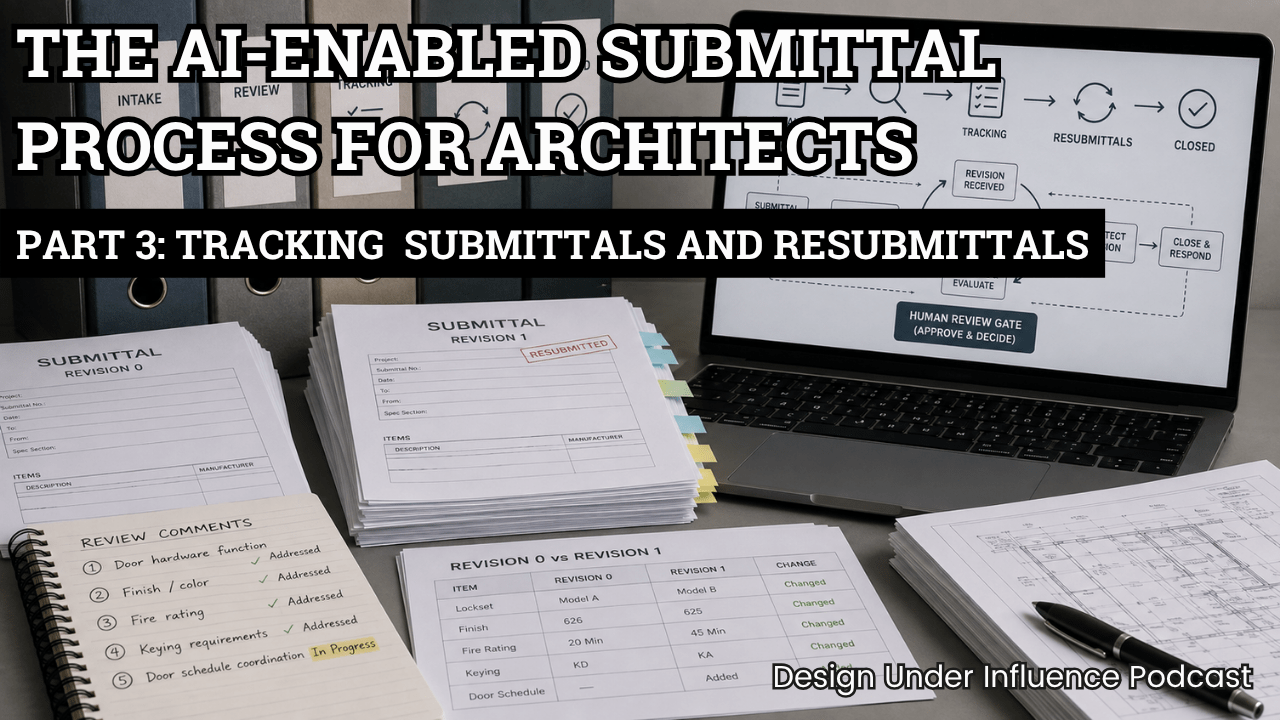
The AI-Enabled Submittal Process for Architects Part 3: Tracking Architectural Submittals and Resubmittals
AI Closes the Loop on the Architectural Submittal Process
Submittal review does not end when an architect returns a package marked “revise and resubmit.” Someone still has to track the open item, receive the next revision, compare it with the original submission, confirm whether every comment was addressed, update the project record, and prepare the response to the contractor.
That final stretch is essential, but much of it is also repetitive and time-consuming. In Episode 3 of Design Under Influence, Alex Osenenko and Boris Rapoport demonstrate how AI can assist with tracking and resubmittals while preserving the most important control in the process:
The human gate.
AI can gather facts, compare documents, locate changes, and draft records. It should not make the architect’s professional decisions.
Completing the three-part workflow
This episode completes the submittal workflow introduced in the first two installments of the series.
Episode 1 covered intake: capturing the package and project context, verifying identity and revision information, checking completeness, identifying routing data, and creating the initial tracking entry. In the demonstration, AI helped identify a missing contractor stamp before the package moved forward.
Episode 2 focused on review: connecting the submittal to the project specifications, identifying missing or conflicting information, preparing cited review comments, and organizing the material needed for an architect’s decision.
Episode 3 follows the resubmittal. The goal is to update the status and ball-in-court assignment, compare Revision 1 with Revision 0, account for every previous review comment, and determine whether the item should be closed or sent through another cycle.
For this demonstration, the team uses Claude Desktop Cowork after using Microsoft Copilot in the first two episodes. The change is deliberate: the underlying workflow should not depend entirely on one AI platform. A well-defined process, clear instructions, consistent files, and explicit approval gates matter more than the logo on the tool.
Compare only what changed
The example centers on a door hardware product-data submittal and hardware schedule. The original review contained five comments. Instead of asking AI to repeat a full review from scratch, the team directs it to compare Revision 1 with Revision 0 and evaluate the new submission against each previously issued comment.
The AI is also given a controlled set of preliminary labels:
- Appears addressed
- Partially addressed
- Not addressed
Those labels are intentionally provisional. They organize the evidence for the architect; they do not constitute approval.
In the demonstration, the first four comments appear to have been addressed. The fifth asks for final door-by-door functions and quantities coordinated with the door schedule. Initially, the AI identifies that the door schedule is missing from the available document set. Once that document is added, the comparison can continue with the appropriate project context.
This moment illustrates an important advantage of a structured AI workflow: it can expose an evidence gap before someone mistakes an incomplete review for a complete one.
Separate facts from professional judgment
After the comparison, the AI is asked to recommend whether each item should close or repeat. The prompt includes strict limits: separate facts from judgment, identify decisions reserved for the architect, and do not approve, stamp, close, log, edit, or communicate externally.
That distinction is the heart of the process.
AI can report that a specified lockset changed, a finish was revised, a fire rating was updated, or a supporting schedule is absent. It can identify where the resubmittal contains evidence and where the record remains incomplete. But the architect must decide whether the evidence is adequate, whether a remaining gap is material, and what final disposition is appropriate.
In the episode, the architect reviews the findings and chooses “approved as noted,” closing the item with a response date of July 31, 2026. Only after that human decision does the AI prepare the updated comparison record, tracking log, revision history, and draft email to the general contractor. The email is drafted, not sent.
Give architects more time for their highest and best use
The value here is not autonomous architecture. It is the reduction of clerical drag around architectural judgment.
Searching for the correct files, checking revision identifiers, comparing repeated data, reconciling comments, updating logs, and drafting routine correspondence all consume time. When AI handles that legwork reliably, architects can focus more attention on risk, coordination, design intent, client service, and leadership.
The workflow can also be connected to the systems a firm already uses. Depending on the firm’s environment, smaller skills could retrieve documents from email, a file server, or a platform such as Procore. Those inputs can then feed a larger workflow—or “super skill”—that manages the process from intake through review and final tracking.
The demonstration creates separate output files so viewers can see exactly what changed. In production, the workflow could instead update a controlled master log, subject to the firm’s permissions, standards, and approval process.
Build the process first, then package it
At the end of the episode, the tracking and resubmittal workflow is packaged as a reusable AI skill. The next step will be to combine the individual skills for intake, review, tracking, and resubmittals into a single end-to-end submittal workflow—and test that combined system as one process.
The larger lesson is straightforward: effective AI adoption begins with a clearly mapped workflow. Define the inputs. Define the evidence the system may use. Define the allowed outputs. Define the moments when work must stop for human review. Then test the system against realistic project documents before putting it into daily use.
AI may be able to close the administrative loop, but the architect must remain responsible for closing the professional one.
If you have questions or need help please reach out to us.
ArchIT specializes in providing IT services for architecture, design, and engineering firms.